


Recently one of our suppliers, Aruba, released a new product. They did so while many in the industry are struggling with supply and logistics constraints. I found it interesting that we can now get our hands on the new next-gen equipment rather than the older mainstream gear.
The equipment from Aruba that got my attention is the new AP635.
While the AP535 is something we use a lot, the new AP635 uses the new 6GHz spectrum.
I have been keeping my eye on these developments for a few years. The 6GHz spectrum allocation for WiFi has been rolled out in the US and the Australian spectrum regulator (ACMA) is looking to open up this part of the spectrum also.
The new wifi standard that uses this new spectrum is or will be called WiFi6E. The allocation in the US and hopefully in Australia opens up 1.2GHz of spectrum for WiFi use. The added spectrum simply adds more channels and the WAPs use the spectrum in the same way (802.11AX) so the new technology will work with old.
The new spectrums use is a little more complex than the existing but relatively straight forward. The US FCC has led the way in the allocation of this spectrum and so it is interesting to see how they proposed to manage it as it might end up being what we also can use.
 The 6GHz WiFi spectrum is broken into 4 new ISM categories or bands (U-NII) and the use of these varies depends on internal or external use and they have power level maximums that need to be adhered to. The channels are broken up into multiple 20MHz channels consistent with existing 5GHz channel
In the US operators can choose ISM band U-NII-5 and U-NII-7 for indoor and outdoor use with power levels up to 36dBm EIRP (which is a massive 4W of power). Indoors operators can use ISM bands 5 through 8 but at lower power levels of 30dBm EIRP (which is still a big number) and the WAPs that can operate in this way cannot have external connectors (ie they want to limit the EIRP). So obviously WAPs using external antennas will be limited to UNI bad 5 and 7.
For context, in Australia our current 5GHz spectrum provides us 21x20MHz, 9x40MHz, 4x80MHz and 2x160MHz channels.
In Australia ACMA has proposed in December 2021 to open 5.925 to 6.425 GHz of the spectrum (like the U-NII-5 in the US) for use by WiFi with a power limit of 250mW EIRP indoors (24dBm) and 25 mW (14dBm) outdoors. So this will give us 24 extra 20MHz channels. They also started consultation about using the equivalent of U-NII-7 so we might get another 17 or so.
Having a lot more channels will allow us to build fast high density networks and it could permit low cost mesh networking. With so many channels we will have less interference caused by over use of limited channels. I see benefits here with large high rise buildings and the like. I am keen to see Australia follow the lead of the FCC so we can start to use this technology here. There are many clients I would like to set up using this spectrum!
READ MORE NEWS
Related Articles

August 24, 2026
How to Adopt AI Safely in Your Business: Inside a CEO’s Real Decision-Making Process
READ ARTICLE


For a long time, we have been working with our clients on designing, building and operating cyber security infrastructure and would traditionally work with the information technology team. We still do, however with the increasing profile of risks that many organisations face, we are finding that we are increasingly working with owners and boards or assisting the IT team to do so.
In recent times I am aware that many organisations have obtained cyber risk insurance which is a positive step. However, what we are seeing is a gap between what they have committed to achieve in the policy, and what is actually implemented. I have experienced situations where the CFO has answered the questions for the underwriter and paid for the policy while the IT team don’t even know the policy exists. This situation could understandably create both a security and financial risk to the organisation.
The Australian Cyber Security Centre (ACSC) has created a framework to help organisations measure risk and protect themselves against an attack or incident. This framework is called the “Essential 8“. Some insurance policies refer to this framework (amongst others like ISO27001 for example) as a minimum standard and non-compliance will mean that the cyber risk policy is ineffective. Outside of the insurance discussion, Essential 8 is also a great framework to implement (as a starting place for most organisations).
The Essential 8 was created to predominantly help organisations that use Microsoft (MS) software, but is useful framework for organisations that use other software systems such as Google. This was chosen because of the widespread use of the MS suite technology and to create a standardised or generic template that is easy to understand.
The framework is based on eight (8) key disciplines that should be implemented in an organisation today and four (4) levels of maturity for each. The four levels of maturity are linked to the sophistication of an attacker the organisations are likely to encounter. Your insurance underwriter could request that you be, or that you might commit to be at a specific maturity level.
The simplified version of this is shown in the table below.

There are other frameworks available. NIST publish one that is often referred to in insurance policies and in rarer cases clients need to work to the Australian Federal Government ISM framework. Some industries are regulated, and they may call on specific requirements of regulators such as APRA in for finance and insurance industries.
We encourage organisations we deal with to ask the questions about what commitments have been made, analyse the needs of the business, review its current systems, and focus on closing the gaps.
READ MORE NEWS
Related Articles
August 24, 2026
How to Adopt AI Safely in Your Business: Inside a CEO’s Real Decision-Making Process
READ ARTICLE


I have presented other solutions before based on new 60GHz short haul wireless links. Those are based on 802.11AD technology from Aruba, Ubiquiti and others.
Recently we implemented another solution based on Cambium technology that operates in the 60GHz spectrum also but uses the 802.11AY technology developed originally to build the Facebook Terragraph network.
This equipment is on another level! A bit like taking an aircraft carrier to go shopping!
So, at base level this equipment uses the same spectrum (60GHz) as other (AD based) solutions but the difference is that it is designed to establish carrier grade last mile internet service delivery, at very high speeds. We can also use them in private networks to create very high speed campus mesh networks that self heal or simply high speed point to point or point to multipoint networks.
There are 3 key differences with this equipment:
- In its default state or configuration the equipment creates its own IPV6 network with its individual MAC address forming part of the IPV6 address of any node. So when you power them up, these devices find each other and create their own mesh network using Open/R (OSPFV6 like) routing methodology. In this mode a router using IPV4/IPV6 needs to be connected to the wireless node. Any and multiple nodes can be the POP uplink and will work with BGP protocols for those. Some planning is required but its very straight forward to set up a city wide network.With a simple click of a software radio button, the system transforms into a more traditional bridged network, much like what we would achieve with Aruba or Ubiquiti. Like most of this gear on the market they rely on GPS receivers for syncronisation.
- The antennas on the Cambium gear is very different. They are a phased array group of antennas in a matrix of 8×8. Other vendors might use 2 or 3 antennas. But Cambium use 64! They rely on phased array antenna principles to aim the antenna. So this means, you can install nodes, roughly align them and the nodes point the antennas to the other nodes electronically – gone are the days of physically aligning antennas and listening to a tone max out. What’s cool is that you can move the nodes about (or the wind can) without re aligning them. The electronic aiming occurs in two dimensions.The high gain antennas (on the V3000) need a bit of alignment as the aiming will only work within a few degrees but makes the installation so easy I can aim roughly with my eye and the gear does the rest.
- The modulation and speeds are different with AY. AD uses 256 QAM on a single channel. AY uses BPSK modulation (16 QAM) but can uses bonded channels, which means the links are more reliable, faster, less latency, and lower error rates.
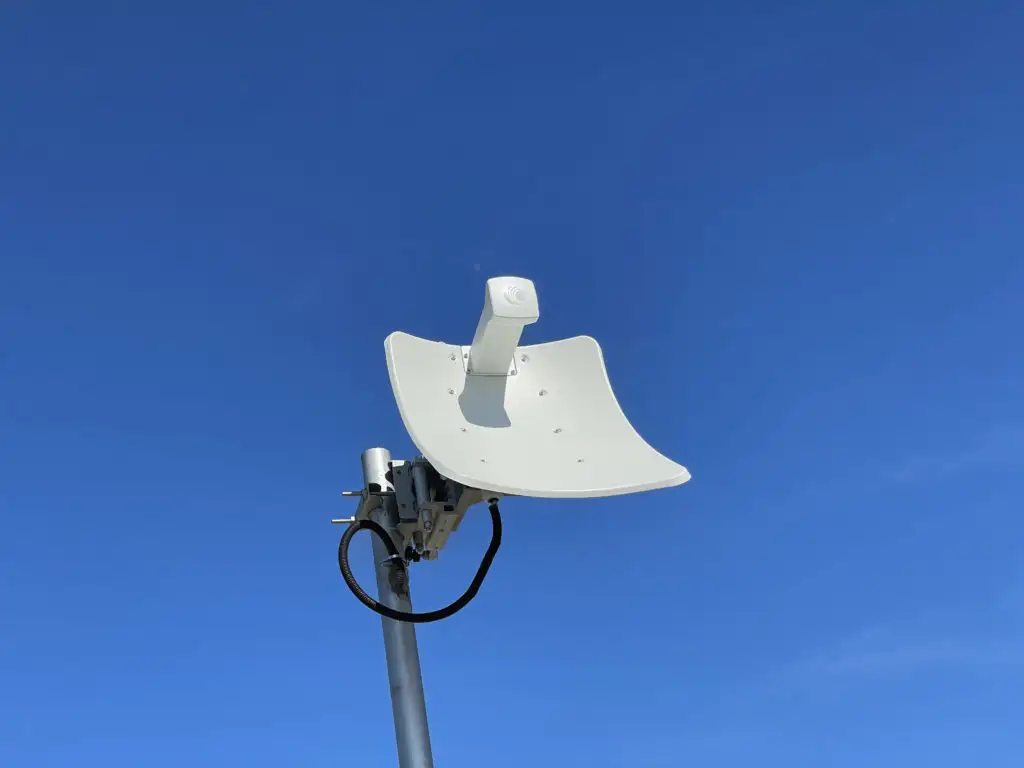
The Cambium equipment is more expensive than Ubiquiti but not much more. There is so much more technology and value in this equipment.
With the initial release Cambium are offer three hardware platforms: V1000, V3000, V5000. The 5000 unit is primarily used as a distribution node or the hub of a network. The V3000 is typically used for longer distance because it has a high gain (44.5dB) antenna as a customer node. The V1000 is a small customer node and imagine it as the carrier access device like an NBN modem. The V5000 and V3000 are available in various permutations to support the building of a large network.
READ MORE NEWS
Related Articles
August 24, 2026
How to Adopt AI Safely in Your Business: Inside a CEO’s Real Decision-Making Process
READ ARTICLE

This week (3-9 May 2021) is Privacy Awareness Week.

At Laminar, we primarily deal with corporates, schools, government departments and the like. Most have a professional staff or team that manage the IT systems and their information. We help these people with their cyber security and other IT requirements. Some of these organisations struggle with cyber security and have suffered economically along the way.
We all however, hear stories about individuals who lose money or control of their identity because of scammers, criminals and plethora of bad actors. Fortunately its easier for the individual than a large enterprise to protect themselves.
A critical part of protect yourself is to be careful where you leave your personal information. I talk about the “Rush to Trust” that people exhibit when using that new cool App, without regard to the information they load up and where it is stored.
To help individuals in a small way we have created LamChat which is a messaging service to rival WhatsApp, Messenger, Signal and others. One of the key differences is that your data stays in Australia and in the control of a local! So if you are sharing family information for example and you use LamChat then that information wont be used to market to you or be cross correlated with your WEB searches and user data on the phone. If you are introducing your children or elders to messaging why give your family secrets to a corporation overseas? If you run a small business you could use LamChat to send sensitive information to your accountants or lawyers also.
We also support the Privacy Awareness Week activity of the Office of the Australian Information Commission (OAIC) which kicks off this week. I highly recommend reading the simple tips on that web site. Keep an eye out for #PAW2021. https://www.oaic.gov.au/s/paw2021/
READ MORE NEWS
Related Articles
August 24, 2026
How to Adopt AI Safely in Your Business: Inside a CEO’s Real Decision-Making Process
READ ARTICLE

One of Laminar’s key engineering principles is being able to provide the real answer to things that are going on. That is – “This is engineering, no guesswork!”
The key requirement for us to live up to this in a timely manner is to have the right test equipment that can provide evidence! We need to measure and prove our propositions design and work, so over the years we have accumulated a large range of test gear and we are always trying the latest!
One of those is the new NetAlly. This device is a palm held 10G network analyser, wifi and cable tester. The system also connects to a cloud dashboard so we can record details of our tests for sharing or record test results for a long period of time.
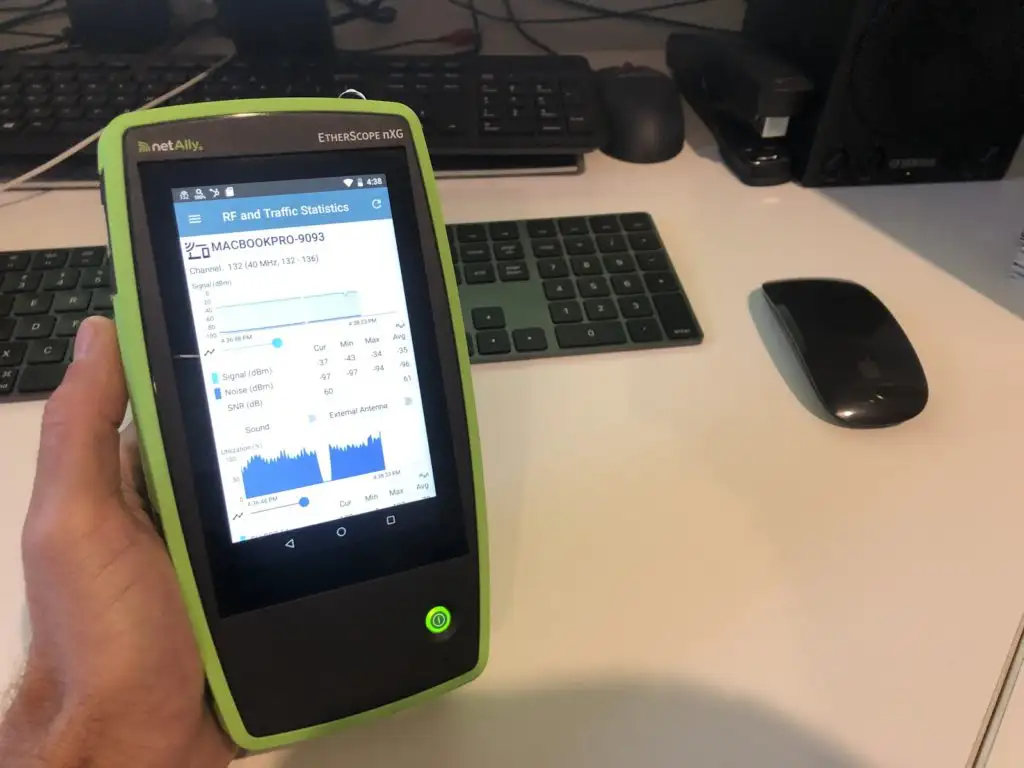
On many occasions we are called out to find or resolve a problem but it does not present itself when we turn up. We can leave this equipment onsite to measure details and record activity over a long time period. This allows us to observe the symptoms and correlate it with potential causes and provide proof of the event. We can also use this method to create benchmarks for future comparisons.
We can use the NetAlly for all sorts of WiFi tests but we can also conduct a wireless survey as the system integrates with our Airmagnet software. We can set up the survey in the hand held tool and simply conduct our walk around survey with the NetAlly.
When it comes to traditional networking, the NetAlly allows us to connect to a network and map out topologies, conduct load tests (wired and wireless), check switch and router parameters. With the cloud connection we can send out a junior engineer to a site with the tester and once connected specialist or more senior engineers can review the results in real time and direct suitable responses or remedial works.
With a click of a button we can conduct a network discovery which reports the results to the cloud account. We can then review it there and convert the results directly into a Visio document which is very handy when it comes to writing the report.
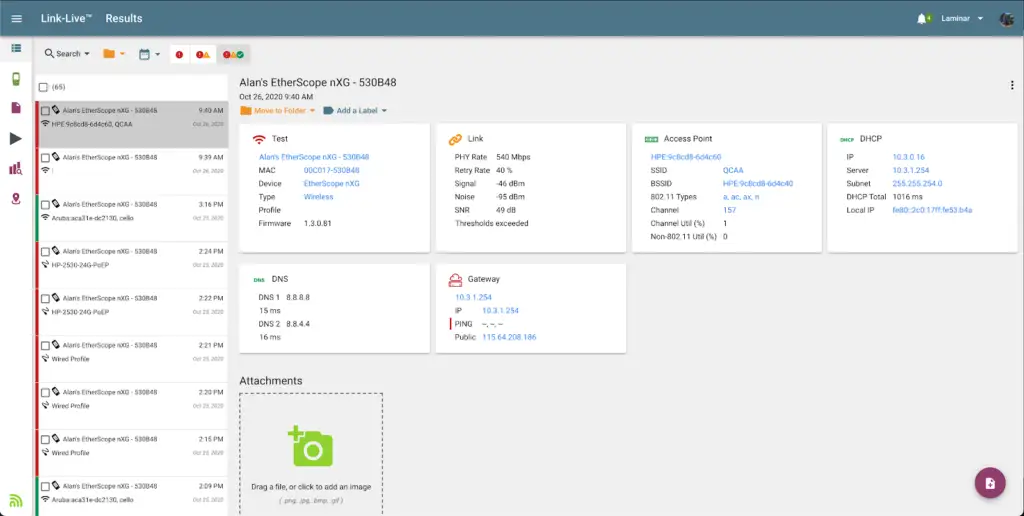
We can also use the tester with our Fluke cable test equipment for basic cable testing. Before deployment of new equipment on existing cable plant we often test critical paths beforehand to make sure we don’t spend time chasing other problems, especially during tight change control windows.
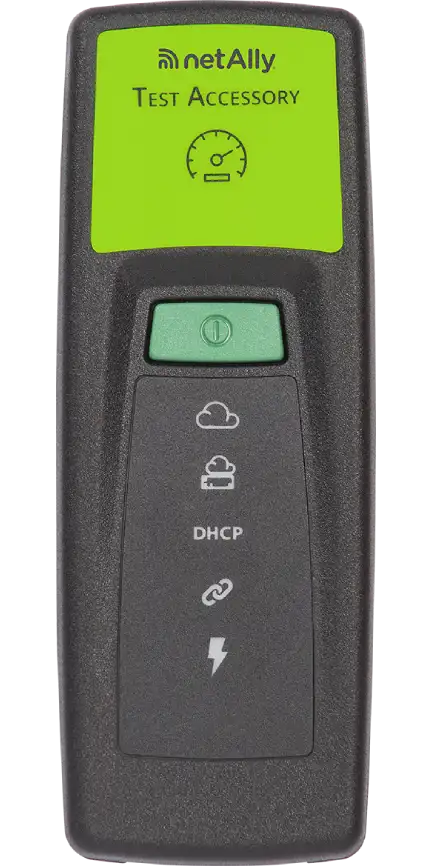
The NetAlly tool is Android based so you can add other applications from the playstore if you wish and ours came with a handy tool called a Netscout Test Accessory. It’s primarily used as an iPerf client/server for load testing but I have found it useful for reporting basic network information to the cloud account. Simply plug it into a switch port and it will connect, get an address and report some basic details for future review. Handy for wandering around client networks to record the basics.
READ MORE NEWS
Related Articles
August 24, 2026
How to Adopt AI Safely in Your Business: Inside a CEO’s Real Decision-Making Process
READ ARTICLE

Hands up, who hates the words “it’s the network” whenever there is an IT fault?
Me! I hate it. I have invested great time and energy to ensure my users are having the best possible experience available. Today, however, “the network” is a very complicated setup. It could be any number of things, including but not limited to;
- DHCP
- DNS
- Authentication
- Authorisation
- RADIUS
- Wi-Fi/RF interference and throughput
- System misconfiguration
- Application response times and downtime
With all of the above making up a network, responsibility for these in some scenarios could be just one or multiple individuals. In very large scenarios this can even be entire teams of people, who have responsibility for these systems.
When it comes to defining the problem and using all this technical jargon, your users do not care. They just want to know it is working. But how do you explain this to them? And how can you say with confidence what your users are actually experiencing?
What if we could have a user that is readily available that we could test, putting you in control before the complaints are even reported? Aruba’s User Experience Insight (UXI) allows for you to have a user experience that tests and records 24/7, allowing you to see in real time what your users are seeing and feeling. It goes beyond the infrastructure monitoring and is agnostic of any network vendor or software; ultimately allowing IT to remedy issues, before users are impacted.
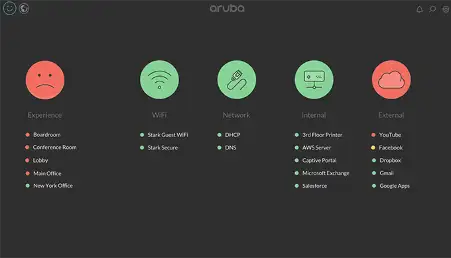
Here are some scenarios across different parts of the network, where this ability could be useful:
User Case – Branch Office/Home Users
Users are complaining about slow network performance, but links and monitoring show the site is available.
The sensor log revealed a local DNS lookup delay leading to sluggish user experience.
User Case – NAPLAN
The pressure is on, NAPLAN is being tested that day. During the days prior everything had been tested, but on the day it falls over. It turns out NAPLAN itself has gone down1.
Alternatively, everything worked fine, but a week later you are asked to explain why a student was not able to complete the test. With the UXI, you have a history to show exactly how the school services performed.
User Case – Conference Rooms and Venues
Wi-Fi is deployed for a special event. Everything is working until a number of users enter and start using personal hotspots. This leads to high channel utilisation and traffic interruptions.
You are able to identify problems in real-time and make the required adjustments without needing to attend the room.
User Case – Head Office
A group of users are not able to authenticate on the corporate Wi-Fi.
A network engineer has misconfigured a RADIUS policy causing user authentication to fail.
The above are just some scenarios that users could experience, but with the power to see what the user will see…so we all end up with happier users.

If you would like to know more about UXI or other solutions, please contact Laminar on 1300 486373 or sales@laminar.co
1.ABC News (2019), NAPLAN computer glitches leave 40,000 WA school students unable to complete tests online. [Online] Available at: https://www.abc.net.au/news/2019-05-15/naplan-test-glitches-prompt-wa-schools-to-abandon-computers/11114770
READ MORE NEWS
Related Articles
August 24, 2026
How to Adopt AI Safely in Your Business: Inside a CEO’s Real Decision-Making Process
READ ARTICLE