


The Patch Window Is Dead. It’s Time to Automate.
Why traditional patch management can no longer keep pace with AI-accelerated threats, growing vulnerability volumes and modern cyber resilience requirements. Patch management automation is becoming essential as organisations face growing vulnerability volumes, faster exploitation timelines and increasing cyber resilience requirements.
For years, enterprise patch management followed a familiar rhythm. Vendors released updates, security teams assessed the risks, change advisory boards reviewed the impact and patches eventually made their way into production. The process was structured, predictable and designed to minimise operational disruption.
In many environments, it still works exactly the same way today.
The problem is that the threat landscape has changed dramatically while patch management processes have remained largely unchanged.
Attackers no longer operate on timelines measured in weeks. Vulnerability disclosures, exploit development and active attacks are happening faster than ever. As a result, patch cycles that once appeared responsible and controlled are increasingly becoming a source of risk.
Patch management was built for a different threat landscape
Traditional patch management evolved in an era where organisations could afford to be methodical. Vulnerabilities were disclosed, security teams assessed their impact and remediation activities were scheduled through planned maintenance windows.
That model assumed one important thing: defenders had time.
Today, that assumption is becoming increasingly difficult to justify. The volume of vulnerabilities continues to grow, threat actors have faster access to information and the time between disclosure and exploitation continues to shrink.
For many organisations, patch management is no longer a technical challenge. It has become a race against time.
The vulnerability explosion is becoming impossible to manage manually
The volume of vulnerabilities is increasing at a pace that is reshaping how patch management must be approached. CVE submissions have risen by 263% since 2020, creating a workload that makes manual prioritisation and remediation increasingly difficult for security teams.
Even NIST, which maintains and enriches vulnerability data through the National Vulnerability Database (NVD), has publicly acknowledged that it can no longer keep pace with the volume of vulnerabilities requiring analysis. As the backlog grows, organisations cannot rely on slow, manual interpretation processes to decide what needs attention first.
This creates a practical problem for defenders.
Security teams are expected to review, prioritise and remediate an ever-growing number of vulnerabilities while balancing operational requirements, resource constraints and business risk. In many organisations, vulnerability management programs are already struggling to keep up with the volume of issues requiring assessment.
The result is often vulnerability fatigue. Teams spend more time reviewing findings, managing exceptions and discussing priorities than actually reducing exposure.
AI is shrinking the window between disclosure and exploitation
Growing vulnerability volumes would be challenging enough on their own. However, artificial intelligence is introducing another factor that organisations need to consider.
Many defenders are already using AI to improve vulnerability analysis, threat intelligence processing and security operations. At the same time, attackers are using similar capabilities to accelerate exploit development and identify opportunities more efficiently. We explored this trend in more detail in our recent article on how AI is accelerating both cyber attacks and cyber defence.
Activities that previously required significant research and manual effort can now be performed much faster. As a result, the time between a vulnerability being disclosed and an exploit becoming available is shrinking.
This changes the economics of patch management.
A patch cycle measured in weeks may have been acceptable when attackers required significant time to weaponise vulnerabilities. Today, those same timelines can leave organisations exposed long after public disclosure.
Why the ASD Essential Eight changes the conversation
The Australian Signals Directorate (ASD) has already recognised this reality within the Essential Eight framework.
For organisations pursuing higher maturity levels, critical or actively exploited vulnerabilities affecting internet-facing systems may require remediation within 48 hours. Not two weeks. Not the next monthly maintenance cycle. Forty-eight hours.
That expectation reflects the current threat landscape.
It also highlights a challenge many organisations face. Meeting a 48-hour patching requirement across large and complex environments is extremely difficult when patching relies heavily on manual review, multiple approval layers and lengthy change management processes.
The issue is no longer whether patching is important. The issue is whether existing processes can operate at the speed required.
The real problem: humans have become the bottleneck
Security teams are not failing because they lack expertise.
In many cases, they are constrained by processes that were designed for a different era.
Manual reviews, approval chains, maintenance windows and change advisory board processes all have legitimate purposes. However, when every vulnerability requires the same level of scrutiny, organisations often struggle to respond quickly enough to the issues that matter most.
Not every patch carries the same level of risk. Not every system has the same level of criticality. Treating all patching activities as though they require identical governance creates unnecessary delays and consumes valuable resources.
The challenge is not removing human oversight. The challenge is applying human oversight where it delivers the greatest value. Many organisations are now supporting internal teams with virtual SOC capabilities to reduce operational overhead and improve response times.
What modern patch management should look like
Modern patch management should focus on risk-based automation rather than universal manual control.
| Traditional patch management | Risk-based automated patch management |
|---|---|
| Long approval cycles | Automated workflows |
| Uniform treatment of all patches | Prioritisation based on risk |
| Manual deployment activities | Automated deployment where appropriate |
| Limited response speed | Faster remediation of critical issues |
| Heavy operational overhead | Reduced administrative burden |
The objective is not to automate everything. The objective is to automate the activities that can be performed safely and consistently while retaining human involvement where judgement is required.
For example, organisations may choose to automatically deploy low-risk vendor-tested updates on non-critical systems while maintaining additional review processes for higher-risk changes affecting critical infrastructure.
Key takeaway: The question is no longer whether organisations should automate patch management. The question is which parts of the process can still afford to remain manual.
Automation doesn’t mean removing control
One of the most common concerns around automated patching is the perception that automation reduces governance.
In reality, effective automation often improves governance.
Well-designed patch automation includes testing procedures, approval rules, deployment policies, monitoring and rollback capabilities. Rather than removing control, it allows organisations to apply control more consistently and at greater scale.
The goal is not reckless automation. The goal is predictable, repeatable and risk-aware automation.
Organisations should be able to deploy routine updates quickly while maintaining stronger controls around changes that carry greater operational risk.
Want to explore which automations make sense for your business?
Leave your details here to book a conversation with our team and discuss practical opportunities to improve visibility, reduce operational overhead and strengthen cyber resilience.
A practical roadmap towards automated patch management
Most organisations do not need to transform their patch management program overnight.
A more practical approach is to introduce automation gradually.
Stage 1: Improve visibility
Develop a clear understanding of assets, vulnerabilities and patching status across the environment. Visibility is often the first challenge organisations need to solve before they can automate remediation activities effectively.
Learn how Lumenir, our SIEM-as-a-Service offering, helps organisations build the visibility required for modern cyber defence.
Stage 2: Prioritise by risk
Focus remediation efforts on vulnerabilities that create the greatest operational or security risk.
Stage 3: Automate low-risk updates
Identify routine patching activities that can be automated safely and consistently.
Stage 4: Introduce controlled automation
Expand automation through predefined workflows, testing procedures and rollback capabilities.
Stage 5: Continuously optimise
Review outcomes, refine policies and adjust automation strategies as business requirements evolve.
Frequently asked questions
What is automated patch management?
Automated patch management uses software and workflows to deploy updates with minimal manual intervention while maintaining governance and oversight controls.
Why is patch management becoming more difficult?
The number of vulnerabilities continues to increase, attackers can weaponise vulnerabilities more quickly and organisations are managing increasingly complex environments.
What does the ASD Essential Eight require for patching?
The Essential Eight includes specific remediation requirements for operating systems, applications and vulnerabilities, with stricter timelines at higher maturity levels.
Does automated patching increase risk?
Not necessarily. When implemented correctly, automation can improve consistency, reduce delays and help organisations respond more quickly to critical vulnerabilities.
Should every patch be automated?
No. Organisations should apply automation based on risk, business impact and operational requirements rather than adopting a one-size-fits-all approach.
Final thoughts
Patch management has traditionally been treated as a scheduling problem.
Increasingly, it is becoming a speed problem.
As vulnerability volumes continue to grow and attackers gain access to more powerful tools, organisations need to reconsider whether traditional patching processes remain fit for purpose. The goal is not to eliminate human oversight. The goal is to ensure that human expertise is focused where it matters most.
For many organisations, that journey will involve greater visibility, stronger prioritisation and a gradual move towards automation.
The patch window is not disappearing because organisations want it to.
It is disappearing because the threat landscape is moving faster than traditional processes can keep up.
READ MORE NEWS
Related Articles

August 24, 2026
How to Adopt AI Safely in Your Business: Inside a CEO’s Real Decision-Making Process
READ ARTICLE

May 12, 2026
AI Cybersecurity Risks Every Business Leader Must Address in 2027
READ ARTICLE
Enough has been said about COVID and what that means to businesses. We have rapidly moved to a mobile workforce that can work from anywhere. What we need to think about now though is the potential increase of data breach points for company data. We frequently talk about data breaches as a hacker compromising the corporate network, but what about all the personal devices that now have company applications installed on them or users who are now using SaaS applications (Xero, MYOB, Slack, Zoom, WebEx or Box etc). The attack surface has dramatically expanded. Think about how many files have been shared or downloaded from these platforms onto untrusted devices. Suddenly, we have a data breach that we are not aware of.
Very few companies are fortunate enough to be fully cloud deployed and most on-premise companies have at least some cloud usage by now. The struggle is about how to control all of this while allowing flexibility for users to get work done. If you make it too hard they will just go around your security and create their own solutions. Remember that this is not just a technology problem you also need to ensure your users are involved. Ensuring users understand the need to comply with these restrictions, following company security policies and following good security practices such as secure storing of passwords.
So can we meet our security requirements and keep our users happy? The answer is simple; conditional access, but what does this mean to different people…
For Security Teams - Depending on the end users device and how compliant it is to the organisation's security requirements dynamically defines what users can access.
For End Users - Users are able easily access organisations resources without compromising security.
Scenario: The national sales manager is travelling for a very important meeting with your organisation's biggest client the next morning at 8am. That night the corporate provided machine dies and no longer turns on. With this information you receive a very disgruntled phone call saying that you are responsible and you need to provide a solution.
Normally this would be a disaster, but what if all they required is an internet connected device to get them going. We could beg, borrow or buy a cheap computer and treat it as another BYOD device.
So what does this design look like?

Step 1 - The user connects using either; Corporate managed device, Enrolled device or untrusted device
Step 2 - Security evaluation is undertaken of; user credentials, device type and user location
Step 3 - If the user, device and location meet the conditions users are allowed to access organisations internal resources. This could be Remote Desktop Services(RDS), Citrix, Virtual Desktop Environment(VDI) or newer cloud hosted desktop environments.
Step 4 - Conditions in Step 2 restricts login to external 3rd party services to authorised resources in Step 3. Users never see credentials and they are unable to recover the passwords. Any downloads and information is then stored on Step 3 controlled services.
Step 5 - If users are using untrusted devices users are still able to access productivity services without the ability to download information allowing for mobile device usage.
With this scenario our Sales Manager is able to login and access their work from any internet connected PC, MAC or tablet. We have maintained the users functionality and most importantly we achieved this while maintaining security. We have now implemented a Zero Trust (1) security philosophy where we always control the outcomes.
The key piece here is Step 2 where the decision conditions are made using a decision engine. At any time we can tighten or relax restrictions to suit an organisation’s requirements and this controls access to external websites. In Step 3 we are able to deploy resources either onsite or in the cloud to scale to meet requirements. This provides a read-only interface where users are provided with a screen and ensures no data leaves our control.
This scenario shows that whilst working from home brings a variety of challenges, it is possible to find a solution that balances security concerns with the needs of the user. Through the above and good security practises we are able to maintain safe and secure access for users.
-->
Enough has been said about COVID and what that means to businesses. We have rapidly moved to a mobile workforce that can work from anywhere. What we need to think about now though is the potential increase of data breach points for company data. We frequently talk about data breaches as a hacker compromising the corporate network, but what about all the personal devices that now have company applications installed on them or users who are now using SaaS applications (Xero, MYOB, Slack, Zoom, WebEx or Box etc). The attack surface has dramatically expanded. Think about how many files have been shared or downloaded from these platforms onto untrusted devices. Suddenly, we have a data breach that we are not aware of.
Very few companies are fortunate enough to be fully cloud deployed and most on-premise companies have at least some cloud usage by now. The struggle is about how to control all of this while allowing flexibility for users to get work done. If you make it too hard they will just go around your security and create their own solutions. Remember that this is not just a technology problem you also need to ensure your users are involved. Ensuring users understand the need to comply with these restrictions, following company security policies and following good security practices such as secure storing of passwords.
So can we meet our security requirements and keep our users happy? The answer is simple; conditional access, but what does this mean to different people…
For Security Teams – Depending on the end users device and how compliant it is to the organisation’s security requirements dynamically defines what users can access.
For End Users – Users are able easily access organisations resources without compromising security.
Scenario: The national sales manager is travelling for a very important meeting with your organisation’s biggest client the next morning at 8am. That night the corporate provided machine dies and no longer turns on. With this information you receive a very disgruntled phone call saying that you are responsible and you need to provide a solution.
Normally this would be a disaster, but what if all they required is an internet connected device to get them going. We could beg, borrow or buy a cheap computer and treat it as another BYOD device.
So what does this design look like?
Step 1 – The user connects using either; Corporate managed device, Enrolled device or untrusted device
Step 2 – Security evaluation is undertaken of; user credentials, device type and user location
Step 3 – If the user, device and location meet the conditions users are allowed to access organisations internal resources. This could be Remote Desktop Services(RDS), Citrix, Virtual Desktop Environment(VDI) or newer cloud hosted desktop environments.
Step 4 – Conditions in Step 2 restricts login to external 3rd party services to authorised resources in Step 3. Users never see credentials and they are unable to recover the passwords. Any downloads and information is then stored on Step 3 controlled services.
Step 5 – If users are using untrusted devices users are still able to access productivity services without the ability to download information allowing for mobile device usage.
With this scenario our Sales Manager is able to login and access their work from any internet connected PC, MAC or tablet. We have maintained the users functionality and most importantly we achieved this while maintaining security. We have now implemented a Zero Trust (1) security philosophy where we always control the outcomes.
The key piece here is Step 2 where the decision conditions are made using a decision engine. At any time we can tighten or relax restrictions to suit an organisation’s requirements and this controls access to external websites. In Step 3 we are able to deploy resources either onsite or in the cloud to scale to meet requirements. This provides a read-only interface where users are provided with a screen and ensures no data leaves our control.
This scenario shows that whilst working from home brings a variety of challenges, it is possible to find a solution that balances security concerns with the needs of the user. Through the above and good security practises we are able to maintain safe and secure access for users.
READ MORE NEWS
Related Articles
August 24, 2026
How to Adopt AI Safely in Your Business: Inside a CEO’s Real Decision-Making Process
READ ARTICLE

Imagine the scene…. a starting line of remote control cars all with Star Wars-themed Ooshie figurines at the helm, a complex racecourse ahead of them and not a person to be seen. Such was the setup of our recently held internal staff catch up.
Due to COVID restrictions we were unable to meet in person for our annual internal conference, however we wanted to create an interactive and team building experience, something different that connected the team that would also still be a bit of fun.
I therefore created the Laminar-X Race contest for our staff. The idea was simple enough, our staff had to pilot their rover that was set up in the office, while they were sitting at home (or overseas in one case)! All they could see was what their rover could see. To make it more exciting they had to race around a course we constructed in our warehouse, which we’d built using items we had laying about, cardboard boxes, witches hats and even safety tape to guide the racers.

The Cars
After a bit of research I settled on a RaspberryPi mini computer solution from Sunfounder. I could write another whole blog about it, but in simple terms they are an introductory computer board designed to teach you computer skills. This meant we had everything we needed: the computer, Wi-Fi, camera, motors and mountings etc. to make it all work.
The cars ran NOOBS OS – an easy operating system installer with some Python scripts to allow us to control the car via a web browser.
Being all geeks at Laminar, Star Wars was always an easy theme to hit on, so thanks to the recent Woolworths Ooshie campaign we had 3-CPO, a StormTrooper, Darth Vader and R2D2 pilot the cars and the Laminar-X race was created.

How it all Worked
The user connected to our office via a secure connection (VPN) over the internet. The car was connected to the office Wi-Fi. Once both were connected, the user was able open a webpage running on the car. The user was then able to control the car via the W, A, S, D keys and the camera via up, down, left, right.
So that everyone could be involved we also had a camera showing the course and events streaming to the internet. Some of our team members participating in the event.
In the end, Jack Kepper proved victorious taking home a small prize (and all the pride!)
READ MORE NEWS
Related Articles
August 24, 2026
How to Adopt AI Safely in Your Business: Inside a CEO’s Real Decision-Making Process
READ ARTICLE

Over the last few years, there has been a lot said about our responsibilities regarding the cloud, security, data sovereignty and availability. When we talk about these topics, we find we naturally are bias to prioritise one over the other, myself included. All our points of view are correct from our perspective and priorities. The internet and the cloud have again changed the way we consume IT services. So, what does this mean to our data centres with their large redundant formats?
Some of us will remember thin clients and terminals that connected to a central mainframe or central servers in a central location. Moving forward the next major evolution was the Wintel (Windows running on Intel PCs) personal computers with IPX and IP networks. This allowed us to distribute the workload to end-user devices and create a far more engaging user experience, with the data centre being geo-located. The internet has allowed the model again to switch to a server and client design (based in Data Centres) and the web browser has become King. But who owns these Data Centres, and are they providing free services, paid public cloud or private cloud?
Cloud Services
The cloud is great for a number of reasons; however, it mostly boils down to cost and separation of responsibilities (refer site and diagram below). The public cloud aims to provide the cheapest possible option but may not provide the protection and features you require. Your private cloud can be hosted directly by you or by a third-party provider on your behalf, and generally it has more options but at a higher cost. Are you looking at a Hyper Converged solution or a full on-premise public cloud solution from Amazon (AWS Outposts), Microsoft (Azure Stack) or Google (GKE On-Prem)?
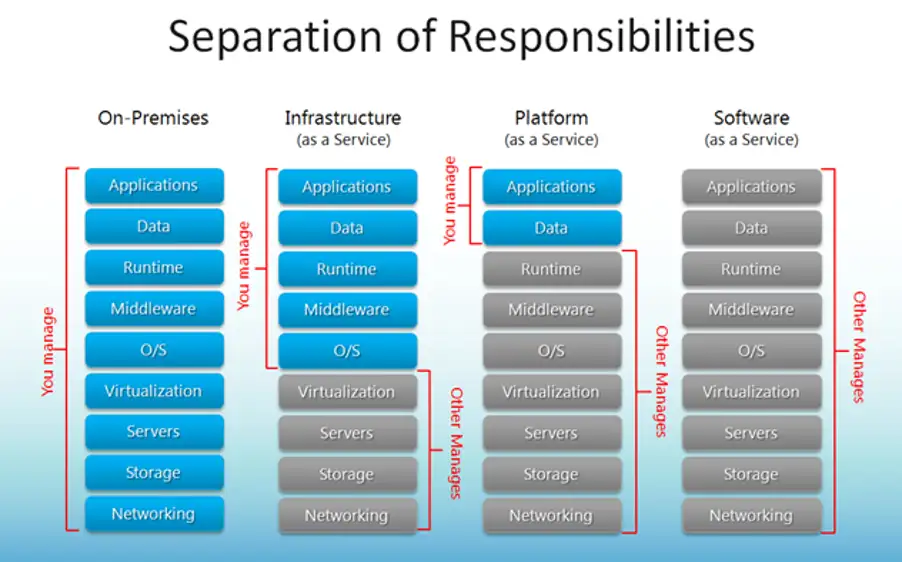
[Reference: https://docs.microsoft.com/en-au/archive/blogs/kevinremde/saas-paas-and-iaas-oh-my-cloudy-april-part-3]
Security
With technology workloads shifting we are now often left with more than one location that we need to secure or protect. If you are using a truly free cloud service like email or social media; free generally means your data is what they are selling. Paid public clouds initially offer basic security but with some additional paid options giving you the ability to increase security options. Lastly there is also the use of 3rd party solutions. These are often more complete products but can lead to a more complex overall solution.
Data Sovereignty
With the initial rush to the cloud, many people overlooked where their data was being stored. The power of the cloud means that their data can be moved without your knowledge or impact to availability. This is great until you realise that you may suddenly open yourself up to regulatory or legal implications. With the recent increase in cloud computing requirements due to COVID-19, providers were stretched to the max and had to redistribute workloads to meet demand. When monitoring a client, we quickly noticed that logins to an internal database were coming from overseas. When our client questioned their hosting provider, it admitted to shifting the client’s data overseas to keep up with demand. The problem for our client was even though they had specified an Australian location, the data was hosted overseas and that meant they were now in breach of their legislative requirements.
Availability
Availability depends on individual business needs, so businesses need to make determinations about the criticality of their systems and services. Can the business afford an IT outage due to; equipment or system failure, environmental, political or security impacts (phishing, ransomware or direct hacking)? As we move our systems to a more shared model of services (through either multiple locations or providers) our risk of security increases as well. Leading to the “what happens when something does fail” and what does this mean to the company, do you have a BCP (Business Continuity Plan)? What are you doing to back up your systems and processes?
Responsibilities and Risk Management
Just as we saw the development of the CFO role in the 1970’s we are now watching the creation of the CIO role as businesses are recognizing a common language of risk.
- What happens when / if my “cloud” goes down?
- What happens if my data is leaked online?
- What happens when my SAAS platform is updated and it changes or removes functionality?
Risk management is what drives business and something non-IT people understand. With Australia’s introduction of the Notifiable Data Breaches (NDB) scheme, in February 2018 company directors now also have direct legal responsibilities.
Just as company directors now have a responsibility to understand what IT is implementing and changing, IT also has the responsibility to continue to grow beyond just simple IT services and support. They are now integral to the infrastructure and performance of organisations today. Every small change can have a big impact on an organisation. What is the cost to the business if a change ends in 100 users being unable to work for 1 hour? Or the change puts the company in breach of legislation?
So, what does mean to the evolution of IT?
IT is no longer a single entity that belongs in the basement. It encompasses multiple locations over multiple mediums. It is a fast-moving disruptive beast; however, it is an integral part of an organisation’s daily operations. How we manage technology and engage with the rest of the business and the wider world is what is needed for us to be successful.
REFERENCES:
[https://mdlaw.com.au/article/non-compliance-privacy-act-breach-directors-duty/]
https://www.actiac.org/system/files/IT%20Management%20Maturity%20Model%202.pdf
READ MORE NEWS
Related Articles
August 24, 2026
How to Adopt AI Safely in Your Business: Inside a CEO’s Real Decision-Making Process
READ ARTICLE

In light of the increasing number of postponed and cancelled events, I got to thinking about the effects to businesses and schools with the rush to move to working at home. Currently a number of companies are offering their services for free for the next 1 – 6 months, however there are also some ways to rapidly allow users to securely access corporate systems from personal devices. So, I thought I would share what I have come across with my peers.
Collaboration / Productivity
Microsoft Teams
Teams now how a new free tier to assist in the disruption https://www.microsoft.com/en-us/microsoft-365/blog/2020/03/05/our-commitment-to-customers-during-covid-19/
Google Hangouts
Google’s premium chat/video collaboration tool is free for G-Suite users https://www.arnnet.com.au/article/671608/google-makes-premium-hangouts-free-amid-covid-19/
3CX Phone System
A great IP based phone system that easily allows for desktop sharing, video and voice calls – https://www.3cx.com/blog/news/covid-19-remote-working/
WebEx
A market leader in online collaboration and meetings – https://www.webex.com/go-covid19.html
Travel
Tripit Pro – My personal favourite travel app now offers premium notifications (delays and cancellations) to standard free users – https://tripit.com/web/covid-19-update/
Remote Access
SSL-VPN Portal
Some firewall vendors offer the ability to host clientless VPN portals that are secured via MFA. This can include access to RDP, website servers and files shares
Remote Desktop Web Access Gateway and Citrix Workspace
Microsoft and Citrix both are industry favourites and allow for applications to be launched via a web browser
Systems Monitoring
For organisations that require additional systems monitoring while short-staffed, Laminar is offering SIEM service for free during this period – https://www.laminar.co/#section-siem-service
Working Remotely
For anyone working remotely, I cannot recommend enough to get yourself a headset to suit your mobile and/or your PC for conferencing. It does not need to be expensive, but this will make the world of difference if this becomes your core form of communication. Laptop mic and speakers are limiting, so ensure you have a headset on hand.
Hopefully the above will ease the discomfort and adjustment to possibly upcoming changes. Should you have any additional concerns or anything you’d like to discuss please do not hesitate to give us a call on (07) 3177 0899.
READ MORE NEWS
Related Articles
August 24, 2026
How to Adopt AI Safely in Your Business: Inside a CEO’s Real Decision-Making Process
READ ARTICLE

There’s no question that the state of password security is problematic and has been for a long time. When humans pick their own passwords, too often they are easy to guess or predict. When we are assigned or forced to create passwords that are hard to remember, too often they are written down where others can see them.
When we are forced to change passwords, too often we’ll make a small and predictable alteration to the existing passwords, and/or forget the new passwords. These can all lead to decreasing the security of your password and when passwords or their corresponding hashes are stolen, it can be difficult to detect or restrict their unauthorized use.
Why We Should Use MFA?
It is evident that we need a better way to create and manage passwords. Banks and big corporates hit on the solution years ago, a second form of authentication aka Multi Factor Authentication (MFA). MFA relies on two or more things:
- Something we know (a password),
- Something we have (Time-based One-Time Password (TOTP), Short Message Service (SMS), Electronic Mail (Email), Push Notifications, Phone Calls) or
- Something we are (biometric information).
In this situation, implementing MFA will prevent hackers from gaining access to your accounts even if your password is known or cracked. The extra layer of protection that MFA offers ensures that your account is more secure.
The New Problem
Most people will have at least some form of MFA security on accounts such as Banking & Financial, E-commerce, Email and Social Media. We can manage this as individuals by using Third party applications like 2STP and Google Authenticator, but what about businesses and the systems they deal with? Increasingly businesses are required to have accounts on multiple third party systems in which employees share passwords to these accounts.
The systems that do provide MFA, do it differently. They now require an additional layer of administration on top of usernames and passwords. These extra layers make them more secure, but are we compromising productivity due to being shackled by security? This can sometimes be the case but we can now manage it.
The New Way
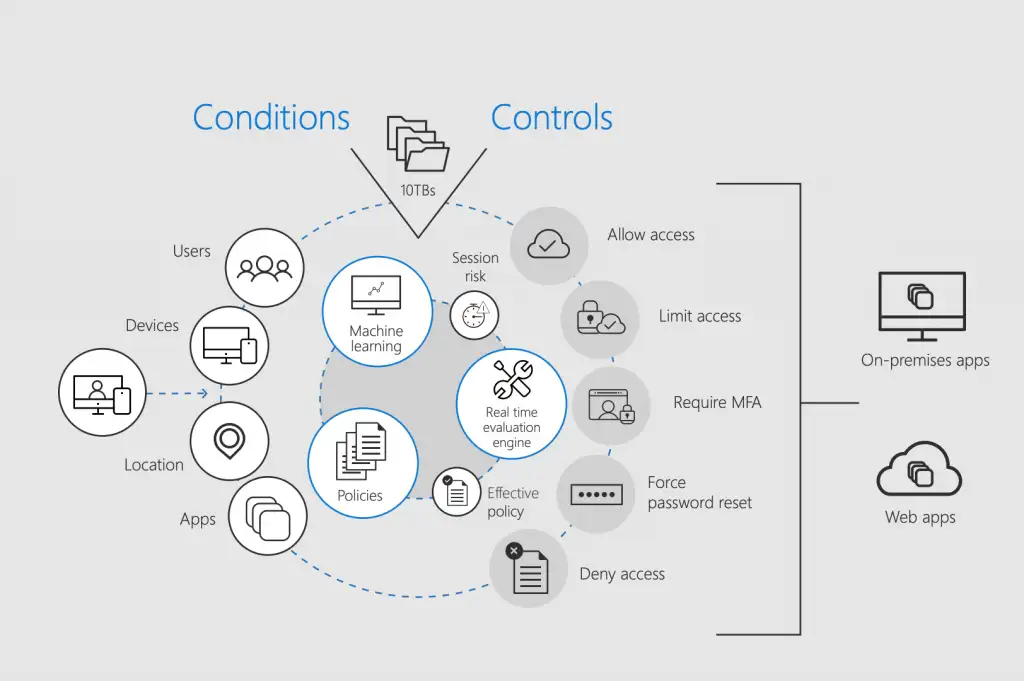
Services like Onelogin, Azure Active Directory and Practise Protect allow for a Secure Single Sign-On (Secure SSO) and remove the need to manage multiple MFA types and passwords between third party systems. When pre-existing integrations don’t already exist we can create new ones.
These services can allow us to do the following;
- Choose when MFA is applied by time, location and or type of information being accessed
- Allow access from BYOD devices while still allowing for secure content control
- Integrate multiple vendors into one platform
- Secure access to company social media and third party platforms using company credentials so employees never know the passwords
- Not use a password at all
These are all problems that can be overcome once we know how to. As a former manager of mine instilled in me Single Sign On or else. Why does it have to be any different these days with MFA? It has now evolved into Secure Single Sign-On.
References:
Microsoft Corporation. (2018). Microsoft 365 + the NIST cybersecurity framework. Retrieved from: https://query.prod.cms.rt.microsoft.com/cms/api/am/binary/RE2x3jO
Margosis, A. (2019, April 24). Security baseline (DRAFT) for Windows 10 v1903 and Windows Server v1903. Microsoft Tech Net. Retrieved from: https://blogs.technet.microsoft.com/secguide/2019/04/24/security-baseline-draft-for-windows-10-v1903-and-windows-server-v1903/
READ MORE NEWS
Related Articles
August 24, 2026
How to Adopt AI Safely in Your Business: Inside a CEO’s Real Decision-Making Process
READ ARTICLE