


Imagine if your hard drive crashed and you lost all your work? Or all your work is accidentally deleted! As nail-bitingly scary as it sounds, the truth is, it happens very often. That’s why it’s essential to back up all your work.
Whilst external hard drives are a great way to save copies of your work – they can sometimes come with the challenge of being misplaced and security risks. Thus, it doesn’t hurt to back up the backup with reliable online cloud storage. So, without further ado, let’s take a deeper look at the best cloud backup systems and some of the most recommended cloud storage options.
What does cloud backup do?
The cloud, also known as online backup, is a method of safely saving and storing a copy of your files on a hosted server delivered over the internet. These servers are in data centers across the world.
The cloud allows you to access your files and applications anywhere and on any device. This is possible because of a technology called virtualisation. Virtualisation uses software to create a virtual machine enabling organisations to run multiple systems and applications on one server. There are several benefits of virtualisation, including
- Cutting down on IT costs
- Increase efficiency and productivity
- Economies of scale
Five advantages of cloud backup
On the other hand, the advantages of cloud storage for businesses include:
- Data protection
- Cost-effective and affordable
- Easy access anytime, anywhere
- Simple to use and boost efficiency and productivity
- Automated solutions allowing to schedule backups
If you’re wondering why it’s called the cloud – well, it all began with industry slang and stuck around.
What to look for in cloud backup
We often get asked what should I look for when choosing a cloud provider. To answer this question, we suggest you look for the following.
- Cloud security features offered both paid and free.
- Ensure the cloud backup solution helps you meet compliance standards within your industry.
- Consider both the sticker price and associated costs.
- Consider how the system will fit into the business architecture. E.g., if your business uses Microsoft or Google services, look for a vendor that will allow for ease of integration.
- Think about day-to-day manageability. You want something that requires less time and effort to get your head around and work with.
- Factor in after-care support. Think about the level of support you wish to have. Will an online chat service be enough, or do you want more?
There are a fair few things to think about before you go ahead and select the most suitable cloud backup storage for you. Just because Google says it’s top-rated doesn’t mean it will be the one for you.
Cloud backup systems we recommend
To help your decision-making easier – we’ve listed three of the top cloud backup solutions we recommend.
These are just the top three to get you started. There are also mobile solutions available for safeguarding your contacts, messages, photos, and documents on your phone, such as G cloud backup.
Get expert advice on cloud backup systems with Laminar
You don’t have to make these decisions on your own. Laminar works closely with the client to provide network solutions whether it be onsite, campus, Datacenter or cloud-based, to best suit the needs of the client and its existing infrastructure and environment.
Laminar’s qualified staff can work with a variety of technologies and maintain vendor partnerships for the best pricing and new technology opportunities.
We work with small businesses through to large enterprises. This broad range of experience enables Laminar to provide robust solutions, whether working with a client’s existing infrastructure or engineering a new solution.
Contact our team today and get the solution to your IT needs.
READ MORE NEWS
Related Articles

August 24, 2026
How to Adopt AI Safely in Your Business: Inside a CEO’s Real Decision-Making Process
READ ARTICLE


The rise of modern digital workplace solutions
Keeping employees connected and providing essential tools to do their job effectively and efficiently has always been a top priority for organisations. Over recent years, technology has become one of those critical tools driving productivity.
The COVID pandemic certainly catapulted and fast-tracked the digital era as people shifted towards remote and hybrid working. With this ongoing trend and demand for flexibility, businesses are now adopting technology fit for the purpose.
So, what are the benefits and what workplace solutions can we expect to see in this new era? Here is our list of five modern workplace solutions for the digital era…
Benefits of digital workplace solutions
The rapid evolution in digital solutions over the past couple of years has enabled and empowered people to be productive on the go. From cloud-based solutions to savvy mobile devices, we can now work from anywhere at any time. For instance, some of these benefits include:
- Access to emails and files at any time, anywhere on any device.
- Constant connection with colleagues via chat and video calling technology.
- Built-in security measures with multi-factor authentication and single sign-on.
- Ongoing latest cyber security measures in place.
These are just some of the many benefits from the list of the good stuff that digital workplace solutions offer.
Five digital workplace solutions you need
Previously, intranets used to be a source for internal communication. Now, as the digital landscape has grown and evolved, you have a variety of technological options to meet, chat and work. Let’s take a quick look at five of the top digital workplace solutions out there.
- Microsoft Office Suite: Commonly used by all and a fan favourite. The Microsoft Office Suite offers a set of programs designed to make everyday tasks easy. These include:- PowerPoint
– Microsoft Word
– Excel spreadsheet
– Email system
– Microsoft Teams for virtual meetings.
All of which are easily accessible on desktop and mobile – making it easy and seamless to complete tasks and collaborate from anywhere, anytime
- LamChat App: Our brainchild and personal messaging service. LamChat is one we’ve been using at Laminar to communicate and share confidential information (internally and externally). It uses the latest ratchet-based encryption technology like WhatsApp and Messenger but with more benefits, including- The data centre in Brisbane houses the messaging server.
– We won’t sell your metadata or correlate it with other information to sell things to you.
– The software on the handsets/computers and servers are open source or written by people in Brisbane.
– LamChat has better security in group chat room situations.
To make it easy for you to get started, we have released our APP for phones in the Apple and Google APP stores. So, if you don’t already have it, go ahead and download it via Google Play or the Apple App Store – it’s free!
- Dropbox: Another cloud-based solution most of you are probably familiar with. Dropbox offers a file hosting service that helps teams easily share and access documents. This simple solution offers more than just file hosting.
- Aruba: Formerly known as Aruba Networks. They are leaders in Wi-Fi 6, switching, SD-Branch, and a visionary in Data Centre networking. The world’s largest companies rely on Aruba to provide secure, AI-powered edge services platforms.
- Starlink/Laminar APUv3: Another one of our genius inventions. Starlink is a satellite internet service provided by SpaceX using a network of low earth orbit satellites. It offers great speed and low latency (approximately 40ms). The other key piece of equipment is the Laminar APUv3. This device provides power in the form of 240V AC and 12V DC and has 1350-Watt hours of storage. It means we can run 150W (enough for a Starlink and other equipment) of power for nine hours. With such network infrastructure solutions in place – you can work remotely from anywhere, under any circumstances – be it rain or shine!
Contact Laminar
Talk to our team today about modern digital workplace solutions. We’ll help you work efficiently and stay connected with your team without a glitch from anywhere in the world.
READ MORE NEWS
Related Articles
August 24, 2026
How to Adopt AI Safely in Your Business: Inside a CEO’s Real Decision-Making Process
READ ARTICLE

Since Facebook formally changed to Meta on 28 October 2021, there’s no doubt that you will have heard and become familiar with the term Metaverse mentioned now and again. However, you may still be wondering, what is the Metaverse and what does this mean for the future of technology, both personally and professionally? Secondary and no less important question is what Microsoft teaming up with Metaverse and Facebook means for workplaces of the future?
Before we jump in and take a closer look at the Metaverse platform, let’s answer one simple question.
What is the Metaverse?
Simply put, the Metaverse is a network of 3D worlds allowing for real-time social connection, or as Mark Zuckerberg states in his founder’s letter, “The metaverse is the next frontier in connecting people, just like social networking was when we got started. In the metaverse, you’ll be able to do almost anything you can imagine — get together with friends and family, work, learn, play, shop, create — as well as completely new experiences that don’t really fit how we think about computers or phones today.”
So, now we know what it means, let’s dive a little deeper.
What are the goals of Metaverse and Facebook?
Over recent years, as technology has rapidly evolved, enabling seamless global connectivity, it is no surprise that post-COVID, there is a desire for digital evolution that allows for more immersive, richer, real-time virtual experiences. This is what Facebook strives to achieve through Metaverse. The ultimate goal is to create a world where you can feel truly present in the experiences through Metaverse apps.
Whilst all this sounds exciting, the question looms – what does this mean for the future of technology products, such as Microsoft, work-life, gaming, and overall cybersecurity?
How Microsoft products could look in Metaverse
Having carefully researched and observed the pros and cons of remote online meetings during the pandemic, Microsoft announced they would be rolling out Microsoft Mesh in early 2022. A feature, according to Microsoft, “allows people in different physical locations to join collaborative and shared holographic experiences, with the productivity tools of Microsoft Teams, where people can join virtual meetings, send chats, collaborate on shared documents, and more.”
However, this is just one of the many concepts as Microsoft begins to integrate Metaverse into their software. Soon, it will be a whole new 3D world of gaming and much more.
How gaming/networking could be in the Metaverse
By investing in Minecraft, Forza, and World of War, Microsoft is heading toward creating a truly connected gaming world.
Besides finding yourself sitting in a conference room in the form of your avatar or hologram through Microsoft Mesh, Metaverse gaming will change one’s experiences whilst playing, as you’ll literally be in the game.
New technology problems that could arise in the Metaverse
The COVID pandemic sped up digital transformations with remote work models in place, which brought a new set of cybersecurity and connectivity challenges. With the adoption of the Metaverse, there’s an opening of new doors to cybercriminals, and we can expect to see an increase in cyber risks such as
- Identity theft – this could mean a hacked avatar.
- Personal data breaches and privacy vulnerabilities.
- An increase in ransomware attacks. Whereby data and information are held at a ransom.
With such vulnerabilities in play, it’s going to require organisations and users to become cyber security savvy and stay one step ahead of the game with crucial security training and measures.
Prepare for Facebook’s Metaverse with Laminar
As we gear up for the Metaverse platform(s) there are a few requirements needed to support the new platform.
- Fast broadband that supports the real-time virtual reality worlds.
- Low latency that’s under ten milliseconds (we wouldn’t want a glitchy hologram of our colleague in the board room now, would we.)
- ISPs that will deliver the fast 2-way traffic.
- 5G Wi-Fi connectivity to enable all the above.
So, to ensure you’re ready for the Metaverse, contact our team today on 1300 486 373.
Laminar builds and operates IT networking infrastructure and is well known for wireless networking (Wi-Fi), core networking, and security systems. As a systems integrator, we design a system for you and then bring the world’s best technology and people together to implement and operate it for you.
We offer custom solutions to ensure your most important business infrastructure is operating at optimum capacity and your most important assets are protected.
So, for fast, reliable, high-speed Wi-Fi solutions, get in touch today and be ready for the future of connectivity.
READ MORE NEWS
Related Articles
August 24, 2026
How to Adopt AI Safely in Your Business: Inside a CEO’s Real Decision-Making Process
READ ARTICLE

One of Laminar’s key engineering principles is being able to provide the real answer to things that are going on. That is – “This is engineering, no guesswork!”
The key requirement for us to live up to this in a timely manner is to have the right test equipment that can provide evidence! We need to measure and prove our propositions design and work, so over the years we have accumulated a large range of test gear and we are always trying the latest!
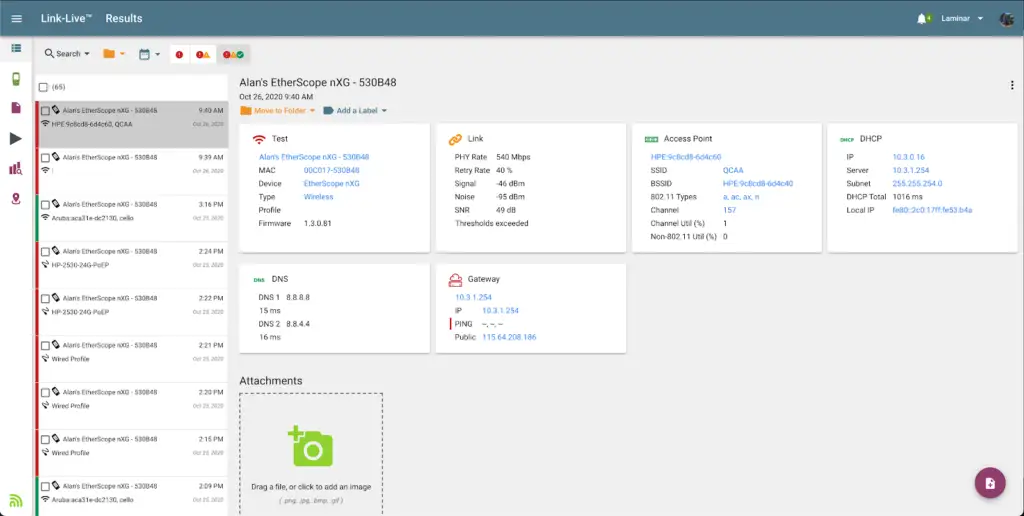
One of those is the new NetAlly. This device is a palm held 10G network analyser, wifi and cable tester. The system also connects to a cloud dashboard so we can record details of our tests for sharing or record test results for a long period of time.
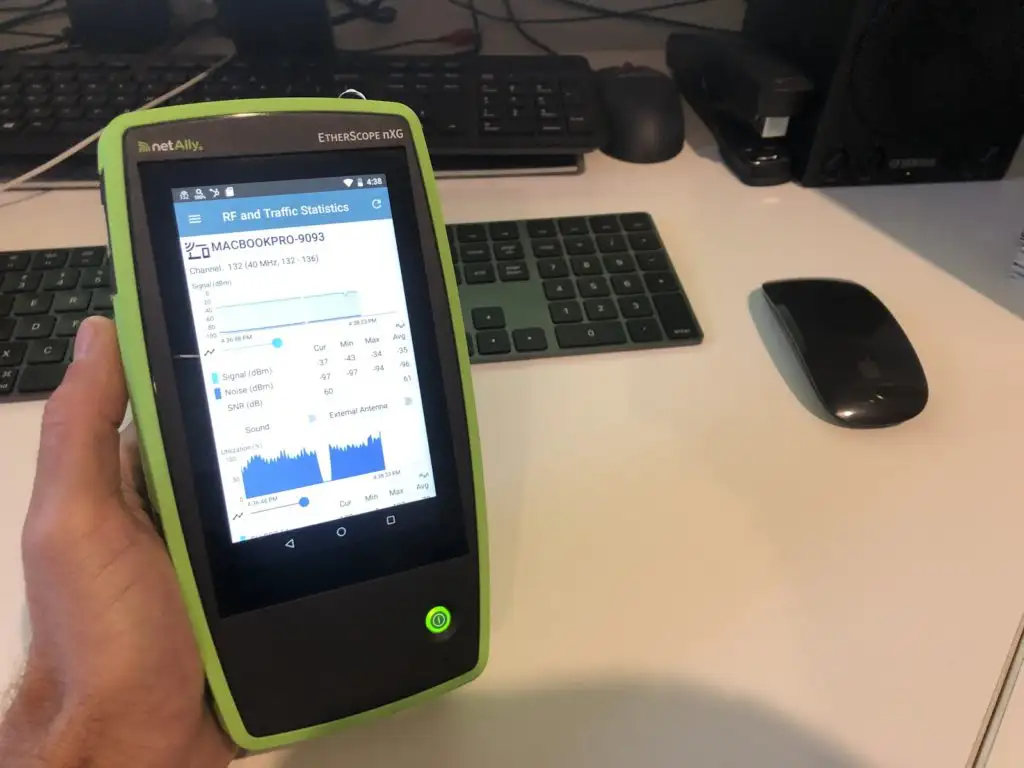
On many occasions we are called out to find or resolve a problem but it does not present itself when we turn up. We can leave this equipment onsite to measure details and record activity over a long time period. This allows us to observe the symptoms and correlate it with potential causes and provide proof of the event. We can also use this method to create benchmarks for future comparisons.
We can use the NetAlly for all sorts of WiFi tests but we can also conduct a wireless survey as the system integrates with our Airmagnet software. We can set up the survey in the hand held tool and simply conduct our walk around survey with the NetAlly.
When it comes to traditional networking, the NetAlly allows us to connect to a network and map out topologies, conduct load tests (wired and wireless), check switch and router parameters. With the cloud connection we can send out a junior engineer to a site with the tester and once connected specialist or more senior engineers can review the results in real time and direct suitable responses or remedial works.
With a click of a button we can conduct a network discovery which reports the results to the cloud account. We can then review it there and convert the results directly into a Visio document which is very handy when it comes to writing the report.
We can also use the tester with our Fluke cable test equipment for basic cable testing. Before deployment of new equipment on existing cable plant we often test critical paths beforehand to make sure we don’t spend time chasing other problems, especially during tight change control windows.
The NetAlly tool is Android based so you can add other applications from the playstore if you wish and ours came with a handy tool called a Netscout Test Accessory. It’s primarily used as an iPerf client/server for load testing but I have found it useful for reporting basic network information to the cloud account. Simply plug it into a switch port and it will connect, get an address and report some basic details for future review. Handy for wandering around client networks to record the basics.

READ MORE NEWS
Related Articles
August 24, 2026
How to Adopt AI Safely in Your Business: Inside a CEO’s Real Decision-Making Process
READ ARTICLE

Hands up, who hates the words “it’s the network” whenever there is an IT fault?
Me! I hate it. I have invested great time and energy to ensure my users are having the best possible experience available. Today, however, “the network” is a very complicated setup. It could be any number of things, including but not limited to;
- DHCP
- DNS
- Authentication
- Authorisation
- RADIUS
- Wi-Fi/RF interference and throughput
- System misconfiguration
- Application response times and downtime
With all of the above making up a network, responsibility for these in some scenarios could be just one or multiple individuals. In very large scenarios this can even be entire teams of people, who have responsibility for these systems.
When it comes to defining the problem and using all this technical jargon, your users do not care. They just want to know it is working. But how do you explain this to them? And how can you say with confidence what your users are actually experiencing?
What if we could have a user that is readily available that we could test, putting you in control before the complaints are even reported? Aruba’s User Experience Insight (UXI) allows for you to have a user experience that tests and records 24/7, allowing you to see in real time what your users are seeing and feeling. It goes beyond the infrastructure monitoring and is agnostic of any network vendor or software; ultimately allowing IT to remedy issues, before users are impacted.
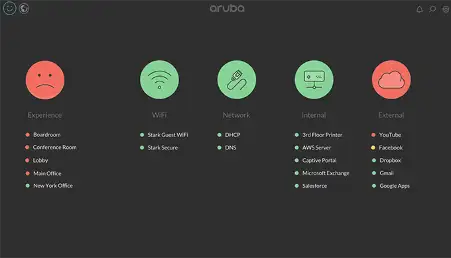
Here are some scenarios across different parts of the network, where this ability could be useful:
User Case – Branch Office/Home Users
Users are complaining about slow network performance, but links and monitoring show the site is available.
The sensor log revealed a local DNS lookup delay leading to sluggish user experience.
User Case – NAPLAN
The pressure is on, NAPLAN is being tested that day. During the days prior everything had been tested, but on the day it falls over. It turns out NAPLAN itself has gone down1.
Alternatively, everything worked fine, but a week later you are asked to explain why a student was not able to complete the test. With the UXI, you have a history to show exactly how the school services performed.
User Case – Conference Rooms and Venues
Wi-Fi is deployed for a special event. Everything is working until a number of users enter and start using personal hotspots. This leads to high channel utilisation and traffic interruptions.
You are able to identify problems in real-time and make the required adjustments without needing to attend the room.
User Case – Head Office
A group of users are not able to authenticate on the corporate Wi-Fi.
A network engineer has misconfigured a RADIUS policy causing user authentication to fail.
The above are just some scenarios that users could experience, but with the power to see what the user will see…so we all end up with happier users.

If you would like to know more about UXI or other solutions, please contact Laminar on 1300 486373 or sales@laminar.co
1.ABC News (2019), NAPLAN computer glitches leave 40,000 WA school students unable to complete tests online. [Online] Available at: https://www.abc.net.au/news/2019-05-15/naplan-test-glitches-prompt-wa-schools-to-abandon-computers/11114770
READ MORE NEWS
Related Articles
August 24, 2026
How to Adopt AI Safely in Your Business: Inside a CEO’s Real Decision-Making Process
READ ARTICLE

Over the last few years, there has been a lot said about our responsibilities regarding the cloud, security, data sovereignty and availability. When we talk about these topics, we find we naturally are bias to prioritise one over the other, myself included. All our points of view are correct from our perspective and priorities. The internet and the cloud have again changed the way we consume IT services. So, what does this mean to our data centres with their large redundant formats?
Some of us will remember thin clients and terminals that connected to a central mainframe or central servers in a central location. Moving forward the next major evolution was the Wintel (Windows running on Intel PCs) personal computers with IPX and IP networks. This allowed us to distribute the workload to end-user devices and create a far more engaging user experience, with the data centre being geo-located. The internet has allowed the model again to switch to a server and client design (based in Data Centres) and the web browser has become King. But who owns these Data Centres, and are they providing free services, paid public cloud or private cloud?
Cloud Services
The cloud is great for a number of reasons; however, it mostly boils down to cost and separation of responsibilities (refer site and diagram below). The public cloud aims to provide the cheapest possible option but may not provide the protection and features you require. Your private cloud can be hosted directly by you or by a third-party provider on your behalf, and generally it has more options but at a higher cost. Are you looking at a Hyper Converged solution or a full on-premise public cloud solution from Amazon (AWS Outposts), Microsoft (Azure Stack) or Google (GKE On-Prem)?
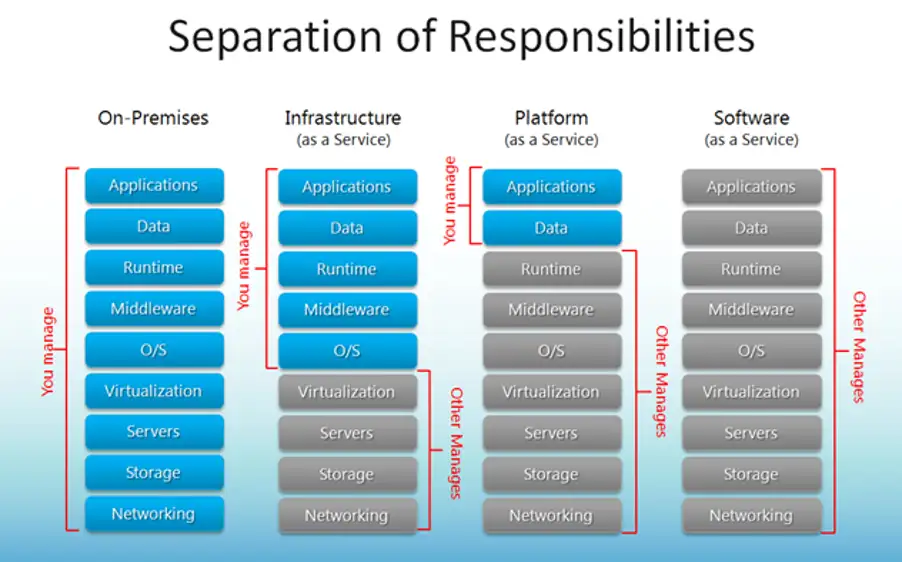
[Reference: https://docs.microsoft.com/en-au/archive/blogs/kevinremde/saas-paas-and-iaas-oh-my-cloudy-april-part-3]
Security
With technology workloads shifting we are now often left with more than one location that we need to secure or protect. If you are using a truly free cloud service like email or social media; free generally means your data is what they are selling. Paid public clouds initially offer basic security but with some additional paid options giving you the ability to increase security options. Lastly there is also the use of 3rd party solutions. These are often more complete products but can lead to a more complex overall solution.
Data Sovereignty
With the initial rush to the cloud, many people overlooked where their data was being stored. The power of the cloud means that their data can be moved without your knowledge or impact to availability. This is great until you realise that you may suddenly open yourself up to regulatory or legal implications. With the recent increase in cloud computing requirements due to COVID-19, providers were stretched to the max and had to redistribute workloads to meet demand. When monitoring a client, we quickly noticed that logins to an internal database were coming from overseas. When our client questioned their hosting provider, it admitted to shifting the client’s data overseas to keep up with demand. The problem for our client was even though they had specified an Australian location, the data was hosted overseas and that meant they were now in breach of their legislative requirements.
Availability
Availability depends on individual business needs, so businesses need to make determinations about the criticality of their systems and services. Can the business afford an IT outage due to; equipment or system failure, environmental, political or security impacts (phishing, ransomware or direct hacking)? As we move our systems to a more shared model of services (through either multiple locations or providers) our risk of security increases as well. Leading to the “what happens when something does fail” and what does this mean to the company, do you have a BCP (Business Continuity Plan)? What are you doing to back up your systems and processes?
Responsibilities and Risk Management
Just as we saw the development of the CFO role in the 1970’s we are now watching the creation of the CIO role as businesses are recognizing a common language of risk.
- What happens when / if my “cloud” goes down?
- What happens if my data is leaked online?
- What happens when my SAAS platform is updated and it changes or removes functionality?
Risk management is what drives business and something non-IT people understand. With Australia’s introduction of the Notifiable Data Breaches (NDB) scheme, in February 2018 company directors now also have direct legal responsibilities.
Just as company directors now have a responsibility to understand what IT is implementing and changing, IT also has the responsibility to continue to grow beyond just simple IT services and support. They are now integral to the infrastructure and performance of organisations today. Every small change can have a big impact on an organisation. What is the cost to the business if a change ends in 100 users being unable to work for 1 hour? Or the change puts the company in breach of legislation?
So, what does mean to the evolution of IT?
IT is no longer a single entity that belongs in the basement. It encompasses multiple locations over multiple mediums. It is a fast-moving disruptive beast; however, it is an integral part of an organisation’s daily operations. How we manage technology and engage with the rest of the business and the wider world is what is needed for us to be successful.
REFERENCES:
[https://mdlaw.com.au/article/non-compliance-privacy-act-breach-directors-duty/]
https://www.actiac.org/system/files/IT%20Management%20Maturity%20Model%202.pdf
READ MORE NEWS
Related Articles
August 24, 2026
How to Adopt AI Safely in Your Business: Inside a CEO’s Real Decision-Making Process
READ ARTICLE